For those who are starting

Describe what you need.
Agents build it.

You no longer have to spend years learning syntax to get a working app. You need to be able to clearly set a task and check the result. Pulse takes care of the rest: it gives the task a separate branch, assigns a team of AI agents to it, shows their every step and checks the work with a second, stronger model.

Windows · macOS · Ubuntu Russian interface First Launch Wizard
Frankly

What has changed - and what has not changed

Promising “a product in a weekend without a single thought” would be a lie. Something else has changed: the work has moved from typing code to setting tasks and acceptance.

Previously
  • First the syntax. Six months for the language, framework and assembly - until the first useful line.
  • The error stops. An unclear message in the console - and the evening is lost.
  • One person - one task. While you are writing the login form, everything else is waiting.
  • There is no one to check. You can’t see your mistakes: you just wrote them.
With Pulse
  • First the task. “Log in using the SMS code, do not touch the payment” - this is enough to get started.
  • The agent reads the error. He sees the entire output of the command and edits it himself; you can see exactly what he did.
  • Several tasks at once. Each in its own branch, the agents do not interfere with each other.
  • Tests a strong model. An inspector reads someone else's code and tells you what's wrong before you even see it.

What Pulse doesn't do: It doesn't turn a vague desire into a product and it doesn't replace understanding of what you're building. You will still have to figure out why a database is needed and what a branch is - but along the way, on your project, and not “before the start.”

Step by step

What it really looks like

None of the above requires writing code by hand. It requires reading what is happening and deciding.

1. State the problem in words

At the bottom of the board is a field where they write in ordinary language: what to do, what not to touch, how to check. Select the project and agent folder. All. Pulse will come up with a name for the task, based on its meaning.

  • There is no project - Pulse will create a repository or clone someone else’s from GitHub using a link.
  • You can attach files - layout, sample data, task text.
  • The “Prepare” button collects tasks for future use to run them at once.
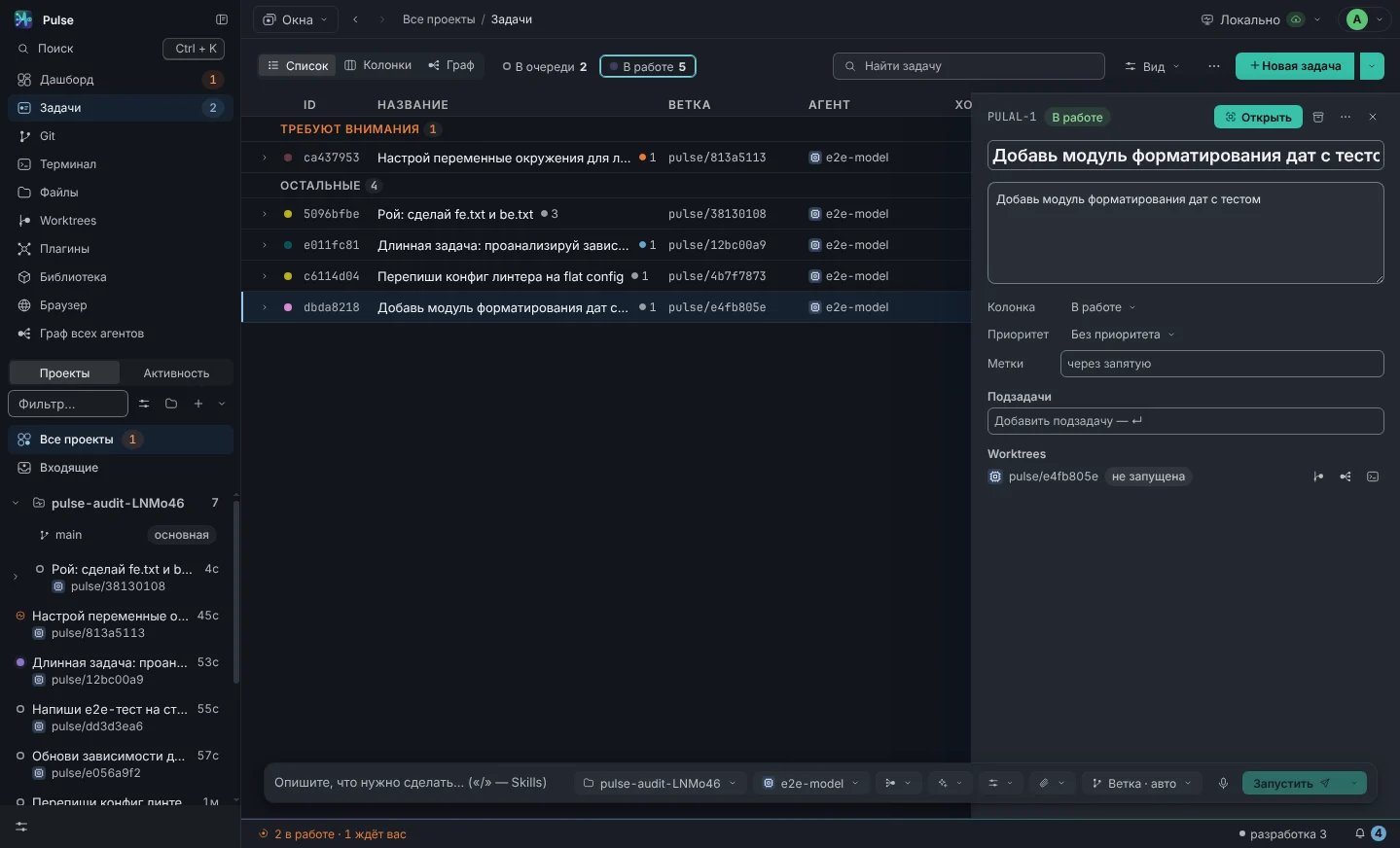
Task board with composer at the bottom: prompt field, repository and agent selection
Board and task composer

2. Watch what the agent is doing

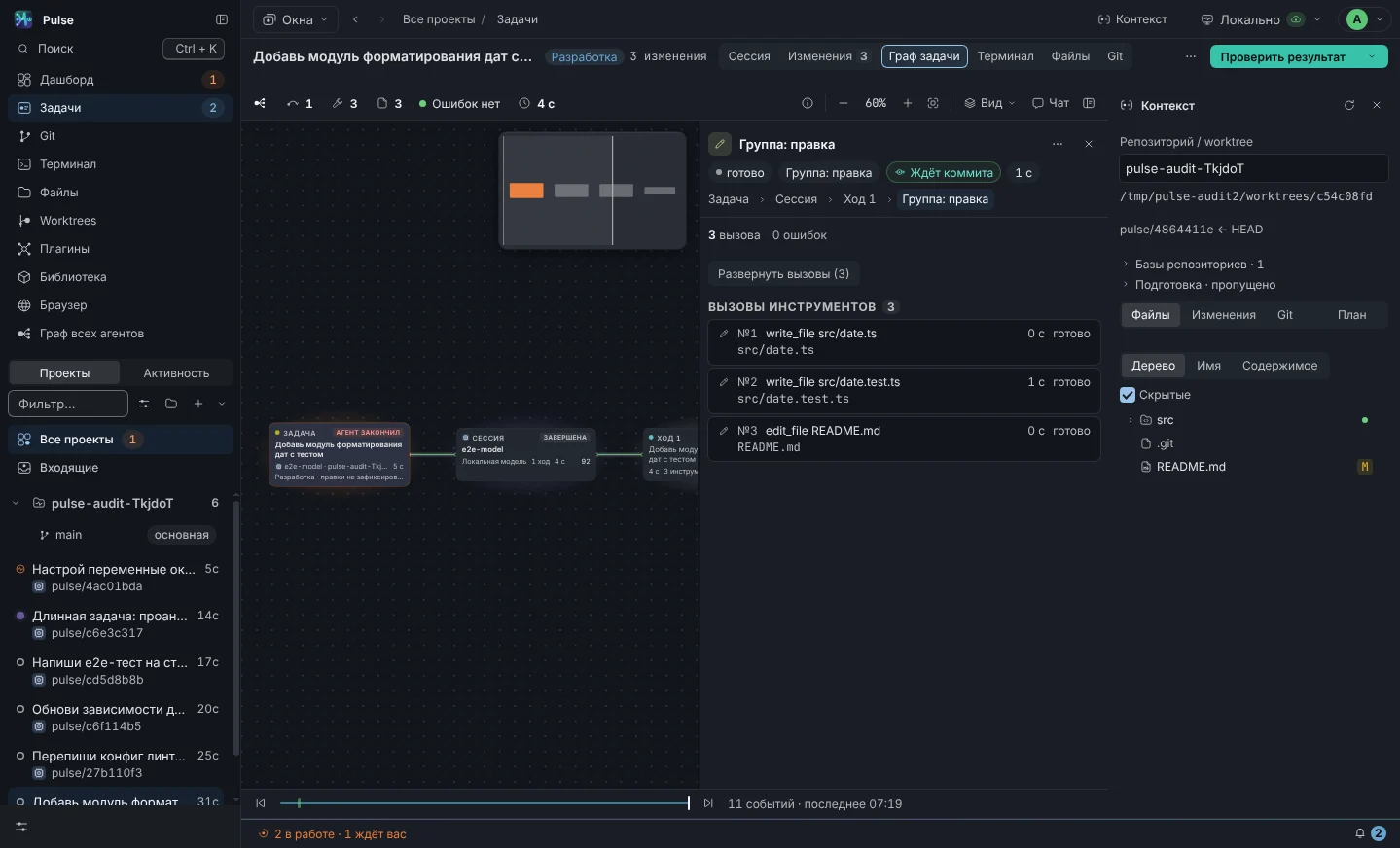
It’s not a “spinner spinning”, but a tree: what files it read, what it launched, where it made a mistake, how much it cost. When an agent wants to execute a command or overwrite a file, it asks whether you allow or deny.

  • It is not clear what is happening - click on any node, its contents will open on the right.
  • If you trust the task, turn on auto mode and the agent will stop asking.
  • Bans always work: he will not be able to delete unnecessary things or send something to someone else’s repository.
Task graph: agent turns, tool calls, contents of the selected node on the right
Every step of the agent is visible

3. Give the task to a team, not just one agent

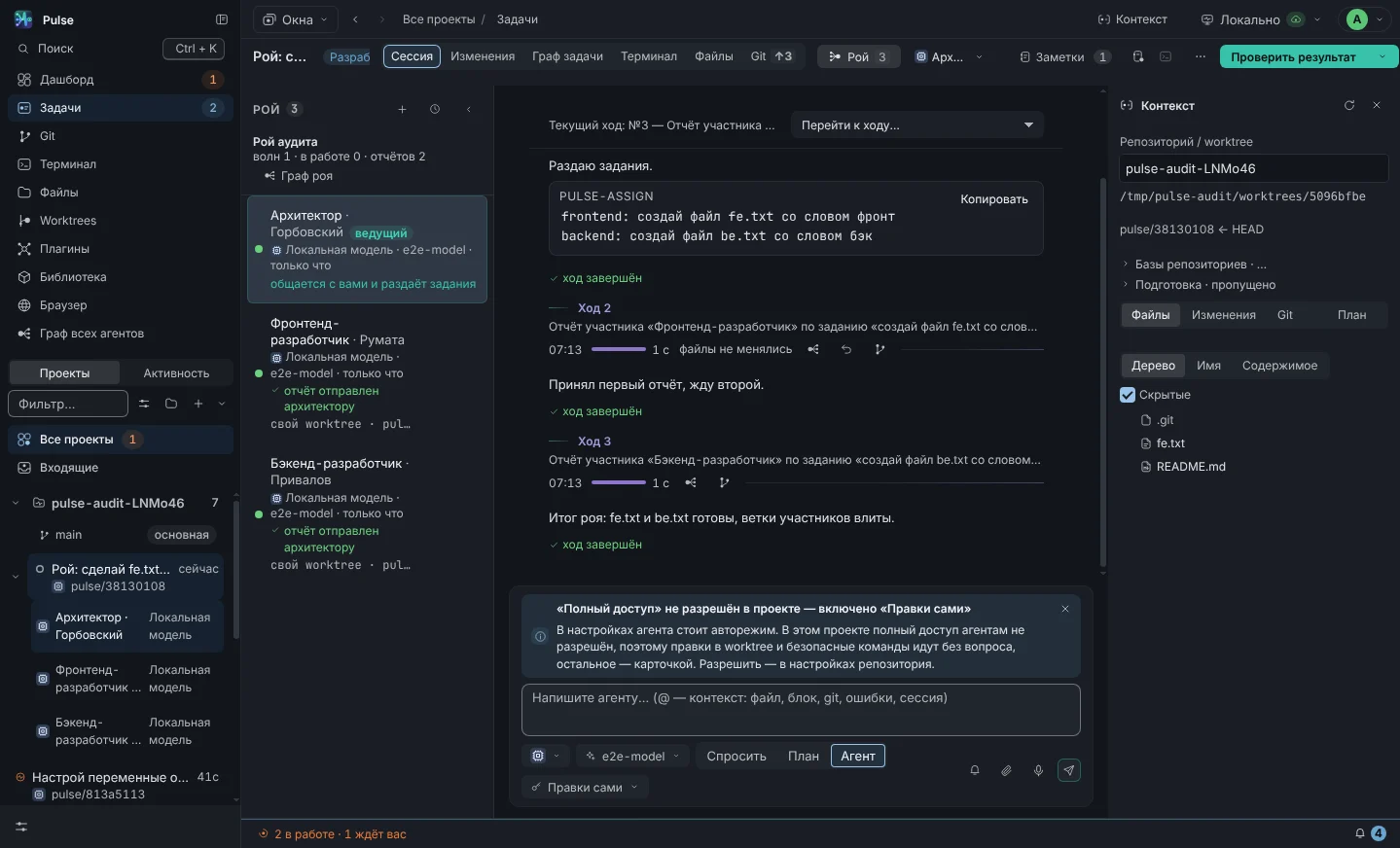
A big task - “make a personal account” - can be given to a swarm. The architect himself will understand the project, distribute parts to the frontend, backend and tester, collect their reports and summarize. You only need to talk to him.

  • The composition is assembled with one button: “Development” - the minimum for a feature.
  • Everyone works in their own copy of the project; if two people touch the same file, Pulse will catch it.
  • A fallen participant restarts itself, a frozen one is interrupted.
Task-swarm: roles with reports and the architect’s summary
Team of roles for one task

4. Check with someone else's eyes

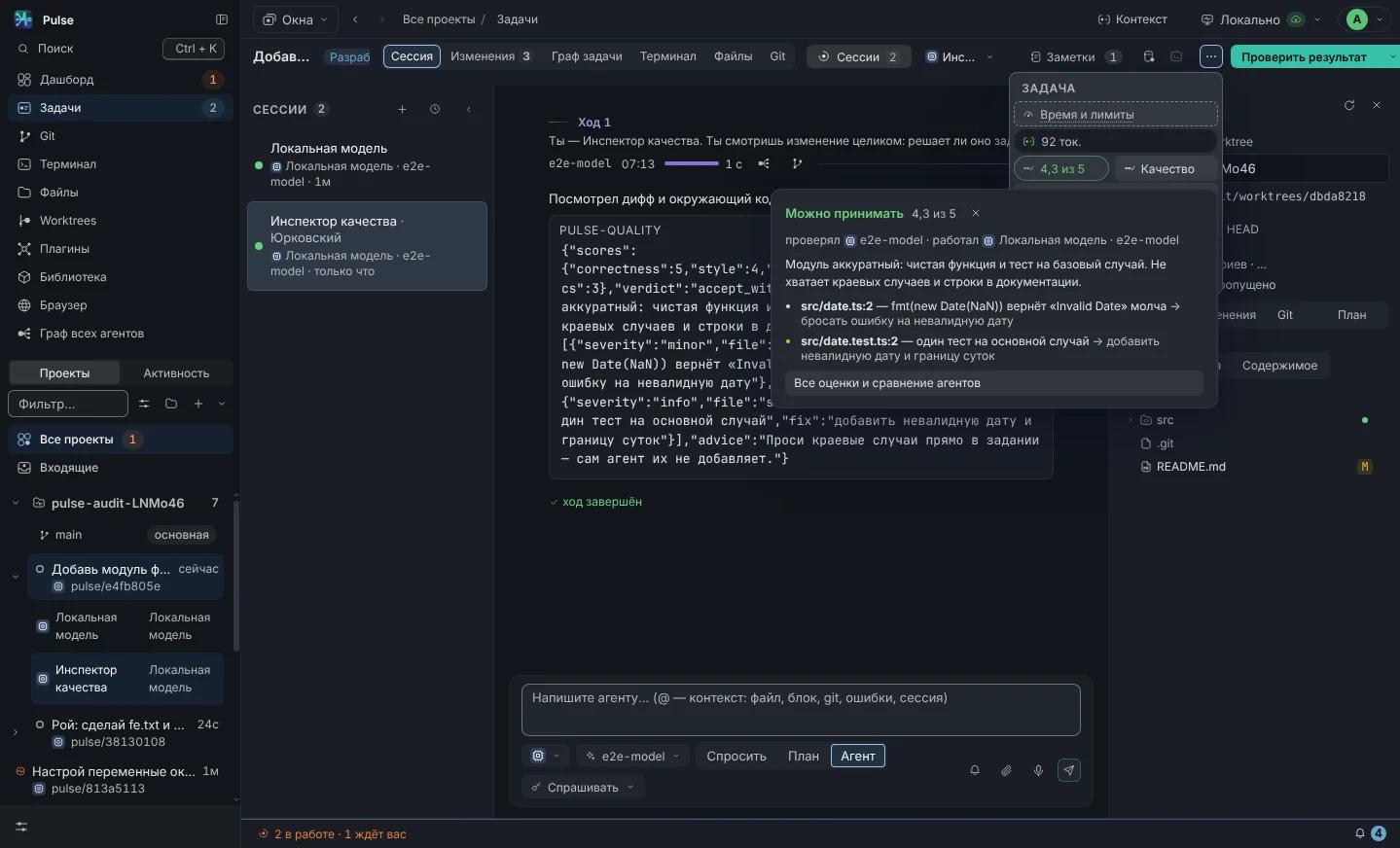
The main danger for a beginner is to mistake a beautiful answer for working code. The inspector is a stronger model that reads what is written and evaluates it on six axes: does it work, is it readable, are there tests, are there any security holes. Findings come in the form of “file, line, what’s wrong.”

  • Can be turned on automatically: each completed work receives a grade.
  • The inspector is not allowed to edit - he only evaluates, he cannot correct “in his own favor.”
  • You can send a bad rating to the author in one message and he will redo it.
Inspector's report: six-axis assessment, verdict and findings with file and line
Agent performance evaluation
First launch

Guided setup, step by step

The most difficult thing for a beginner is not Pulse, but what is around: what programs to install, where to get access to models, what to enter where. Therefore, when you first launch it, a wizard opens on four screens. Each one begins with a decision already made for you - enough ⌘ ↵.

  1. Which agent will be first

    The agents found on the computer are arranged in a grid, the first ready one is already selected. Not installed - the “Install” button runs the installation command for you; next to it is its own model and GigaChat. There is no agent or model - the “What will the agent think” step will appear.

  2. How agents work

    Each task has its own branch and working copy; what the agent does himself and what he asks about; what skills Pulse gives him.

  3. Appearance

    The theme is applied by clicking - the window behind the wizard immediately shows the result.

  4. Notifications, remote and integrations

    Pulse will tell you when an agent is finished or is waiting for you - on your computer and phone; issues from GitHub and GitLab. Next - “What are we working on?”: the found repository, folder, clone or new project.

After the wizard, the “First Steps” checklist remains in the left panel: six settings and three milestones. The items close themselves, according to the facts of the product, and not with ticks; the hidden checklist is returned from Help.

How much does it cost

Count ahead

Pulse does not resell models: you pay the provider directly with your subscription or key. The cost of each turn is immediately visible - on the go, in the task card and on the dashboard.

  • Set a budget for the task. It has reached the limit - work stops until you decide to continue. It is impossible to go into the negative due to inattention.
  • Start with a cheap model. For simple things it’s fast and cheap, for complex things it’s strong. The “who writes better” table will eventually tell you where each one is doing better.
  • There is a free option. The local model on your computer doesn’t cost any money at all - it’s slower, but it’s enough for studying.

Details about consumption and limits

Questions

What they ask at the start

I definitely don't need to know how to program

There is no need to write code by hand. You will have to read it and understand what is happening, otherwise you will not distinguish the working result from the plausible one. The good news is that reading is much easier than writing, and Pulse is specifically designed to show an agent's work rather than hide it.

A quality inspector partially closes this gap: he reads the code for you and tells you what's wrong, in human words.

What is a “branch” and “worktree” - I need to know this

At the start - no. Pulse creates them itself so that tasks do not interfere with each other: each works in its own copy of the project. You will notice this only as “two tasks are running simultaneously and do not break anything.”

When the work is ready, you look at the changes in the “Diff” tab and click “Commit”. This is enough to get started; the rest will come along the way.

And the agent won't break my computer or project

Destructive commands are prohibited out of the box: deleting the root and home folder, actions from the administrator, working with disks, forced sending to the repository. These prohibitions cannot be avoided in auto mode - this is not a hint, but a rule.

The agent runs in a separate copy of the project, and not in your working folder. A bad result is simply not merged into the main branch: the issue can be deleted along with its copy.

Where to start the first task

Small and verifiable. “Add a page with a feedback form and cover it with tests” is a good first task: the result is visible to the eye, and the tests will show whether it works.

A bad first task is “make me a marketplace.” Not because the agent won’t take it, but because you won’t be able to check what happened and won’t understand where he made a mistake.

Which agent should I choose if I don’t understand them?

Start with the one you already have access to. The First Launch Wizard will show you what is installed and instruct you to install the rest. There is no need to install Codex - it is inside Pulse, you only need an input.

If you don’t want to pay for models yet, install Ollama and connect the local model: it’s free and works on your machine. What and how is connected.

Questions

What is usually asked

What is ADE and how does it differ from IDE?

The IDE is built around a file and a cursor. AI-IDE added a hint and chat to them, but the person still sits in one file of one branch.

ADE changes the unit of work: not a file, but a task; not one assistant, but several agents in parallel; not “take a hint,” but see and control everything the agents do with the code.

I need to change my usual tools

No. Pulse runs the same CLI agents you already have installed and uses your subscriptions and keys. The repository remains a regular git repository: worktree and branches pulse/<id> - standard git mechanisms, they can be seen from any other tool.

The editor remains yours too: Pulse does not replace the IDE, it manages the agents. You open the code they wrote where you are used to.

Where do my code and keys go?

Pulse does not have its own servers for your data. Agents go to their providers themselves - just as they would from a terminal. The local model only goes to your server. Tasks, transcripts, logs and keys are located in the application profile on your machine; the keys are encrypted, the encryption key is stored in the system keychain.

Telemetry is disabled by default, and until you enable it, events are not even collected. You can enable it in “Settings → General → Telemetry and crash reporting” by specifying the address of your OTLP collector: start (version, system, processor), place and type of crash and how many seconds each stage of the first launch took - without paths, prompt texts, agent responses and keys; The sent log is visible there. The bug report only goes away when you click "Submit" and you see what goes into it. Detailed diagram - on the page "Control and Data".

What is a swarm of agents and when is it needed?

Swarm - a named composition of roles: architect, analyst, frontend, backend, security, product, tester, DevOps and three inspectors. You communicate only with the architect: he studies the code, distributes tasks, collects reports and sums up.

Developers each work in their own working copy on the branch <task branch>-<role>. The conflict rolls back and goes to the architect, the fallen participant receives the task again, the stuck one is interrupted by a timeout.

A good heuristic: if you couldn’t give a task to three people, don’t give it to three agents - one will be enough to edit one file. Details about the swarm.

Why check an agent with another model?

Cheap and fast models provide very different quality on the same task. The Inspector is a strong model that reads the diff, scores on six axes, and writes down specific findings. He is prohibited from ruling by the role's policy, so he cannot “correct” the outcome in his favor.

Ratings are accumulated in the “agent and model” section - over time it becomes clear who can be trusted with what tasks. Verification costs money: this is a separate session of a strong model, and the budget of the task stops it in the same way as regular work.

How much does it cost in models

Pulse doesn't resell anything: you pay your providers directly with your subscriptions and keys. Pulse calculates and displays the cost of each turn - on the go, in the task chip and on the dashboard.

To avoid surprises, set a budget for the task: when the limit is reached, the sessions stop until you raise it. Local models are considered free - they work on your hardware.

Does this work without the Internet and without foreign services?

With a local model - yes: Ollama or LM Studio on your machine, everything else (graph, policies, memory, swarm, diff, terminal) works without a network. With GigaChat you need access to Sber servers. With Claude Code, Codex, Kimi, OpenCode and Grok - access to their providers; for Grok these are xAI servers.

For a corporate circuit, a vLLM or LiteLLM gateway is suitable: “Local Model” card, gateway address, key. How teams do it.

What systems does it work on?

Windows x64, macOS on Apple Silicon and on Intel, Ubuntu x64. Each assembly is assembled on its own machine: CLI agents come in packages for a specific platform, and an assembly “from someone else’s architecture” would contain broken binaries.

ARM64 for Windows and Linux is not yet available - it is waiting for a suitable runner. Pulse itself will not be available on Android and iOS: it works by launching agents, git, and a terminal on your machine, but there are none on your phone.

But the phone already works as a remote control - not “in the plans”, but now. Open it in his browser pulse.avacloude.ru/mobile/, pair with the machine using the QR code from the Settings → Cloud section - and you see the feed, respond to permissions, send prompts. The phone creates the keys itself, correspondence with the machine is encrypted with an end-to-end key: the server transfers the ciphertext and does not look inside. Until the “Control from phone” switch is pressed, the connection does not open at all.

How to get access and how much it costs

The application is free to download and requires an access code to operate. The code is activated on activation page: email, name, password - and the license is issued immediately. It is tied to an account, not a machine, so you can log in on any computer you own.

There is no code - leave a request at the bottom of the page, we will send it. Participation in the alpha is free. You pay the models directly to your providers: Pulse does not resell anything and does not charge a premium for tokens.

How ready is it for real work?

Alpha: The interface and data model are established, but still change between versions. The logic is covered by 1924 application tests and 206 cloud tests, versions are released almost every day, what has changed is written in log.

What Pulse was written on is Pulse itself: agents in it work on its own code. This is not a guarantee, but it means that we are the first to deal with every breakdown.

Get started

Set your first task today

Pulse is installed on Windows, macOS and Ubuntu. Next, the first launch wizard will lead you to the moment when the agent writes you the first line.

  • Russian interface and documentation
  • First time setup wizard
  • Free on-premises model if you don't want to pay for the cloud
  • No access code - leave a request