Control and data

Agent - performer. The decisions are yours

Pulse gives six levels of control: from a question for each action to a strict prohibition, which is not bypassed by auto mode. And it honestly answers the question of where your code and keys go: agents go to their providers themselves, the local model goes only to your server, Pulse does not have servers for your data.

Six levels

From “ask me” to “no one can”

1 Permissions

Card for every action

The agent wants to write a file or execute a command - a card pops up on top of all windows: tool, command, files. “Allow” once, “Allow in session” for this tool, “Reject” - the agent will receive a refusal and try differently. The card does not block the rest: you can look at the diff and return.
2 Auto mode

When you trust the task

The "Permissions" chip in chat switches the session to "Auto": Pulse itself answers "yes" and puts the agent into its automatic mode. The entry “Allowed by auto mode” remains in the feed. Enabled per session, per agent or per agent variant. Politicians are stronger than the auto regime.

3 Politicians

Rules that don't get around

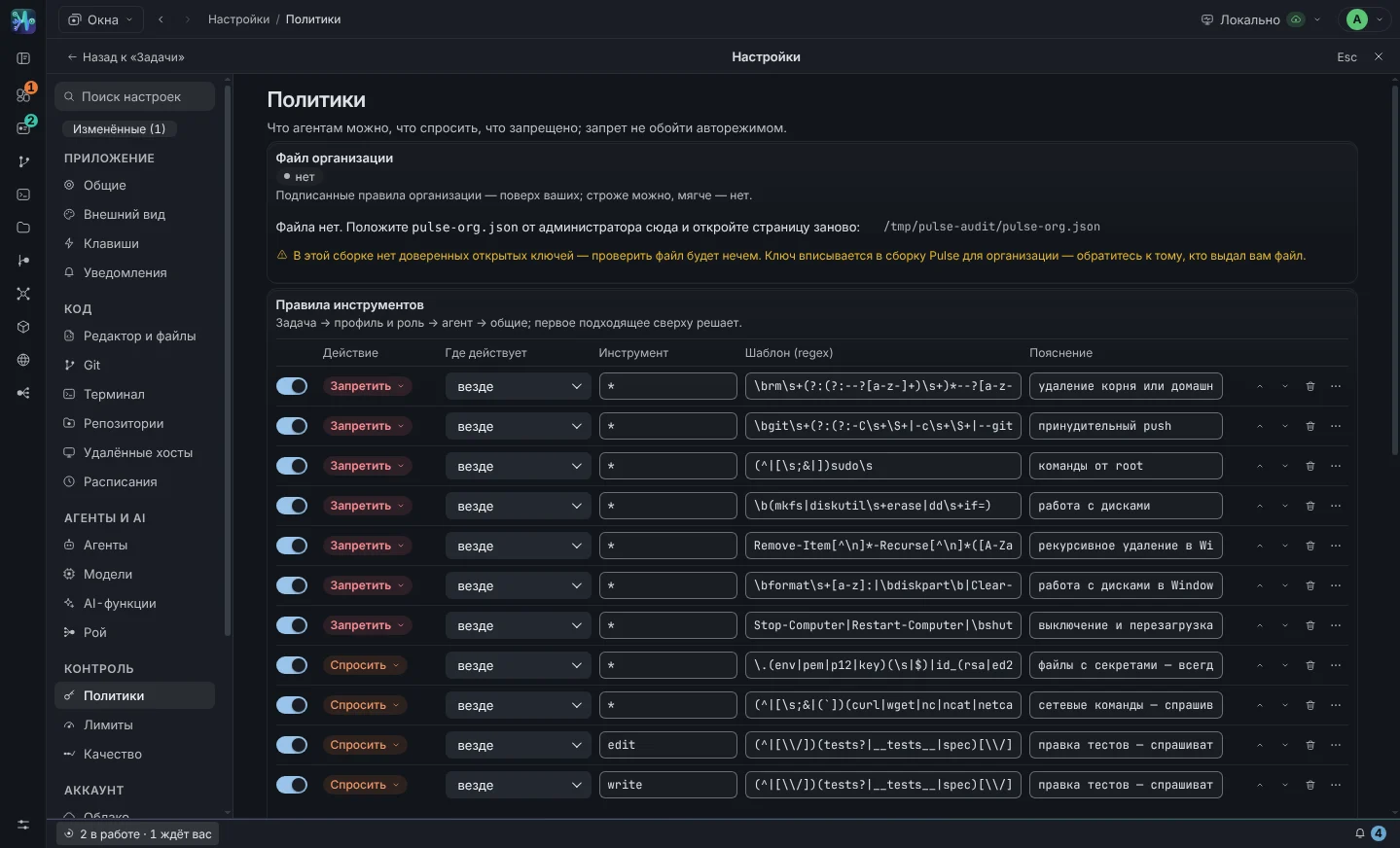
"Allow/ask/deny" by tool and regex by command, paths and call header. The rules are checked from top to bottom, the first one that fits decides. Each rule has an explanation - it is visible in the feed and in the audit.

Bash · rm -rf /prohibit
Bash · git push --forceprohibit
* · .env, .pem, id_rsaask
4 Budgets

Money limit for a task

The total cost of all task sessions against the limit in USD. On the threshold - a notification; When exhausted, sessions are stopped, new turns are not started until the limit is raised. The cost is visible at every turn, in the task chip and on the dashboard. The budget applies to both the swarm and the inspectors.

5 Sandbox

Read and write - within the task

Reading boundary: the agent sees a working copy of the task and what it cannot start without - the system holds it, bwrap on Linux and sandbox-exec on macOS, for external agents via ACP too. There is no mechanism or the test did not pass - the agent team does not start. Recording of the built-in agent is only in the worktree of the task, in the temporary folder and in the caches of package managers. This is a file boundary, not complete isolation: macOS local services and inter-process pipes are not tested.

6 · Audit

A report that can be attached to the analysis

The “Audit” button in the task header uploads Markdown: who ran the tools and when and with what arguments, what permissions were issued and by whom - human or auto mode, which ones were rejected, which rules were triggered, which files were affected, how many tokens and money were spent.

Check procedure

What happens with every tool request

The levels do not argue with each other - they are lined up. The first rule that works decides, and only if none worked does the question come to you. This is why “Deny” in politics cannot be bypassed in auto mode: politics comes first in the queue.

Valid separately role: swarm members with the role of reviewer or inspector cannot edit files or run commands at all - this is checked before the rules, regardless of the mode and settings.

  1. Politics says "Ban"refusal
  2. The role is reviewer and this is file editing or commandrefusal
  3. The budget for the task is exhaustedsession stopped
  4. Policy says "Allow"running
  5. Auto mode or “Allow in session”in progress, recording to tape
  6. Otherwisecard for you
Out of the box

What is prohibited until you decide otherwise

The default set of rules covers something that should never happen - even due to a model error, even in auto mode. The rules can be edited and supplemented: for example, prohibit npm publish or require confirmation for any entry outside src/.

RuleAction
Removing root and home folder: rm -rf /, rm -rf ~prohibit
Forced push: git push --forceprohibit
Commands from root: sudoprohibit
Working with disks: mkfs, diskutil erase, ddprohibit
Files with secrets: .env, .pem, id_rsa…ask
Agent team network: curl, wget, ssh, scp, nc…ask
Editing existing tests: *.test.*, tests/, spec/ask
Settings → Policies Control in documentation
Settings → Policies: list of rules with action, tool and template, “Budget” and “Sandbox” blocks
Rules, budget, sandbox
Data

Pulse does not have servers for your data

The entire state is in your profile on your machine. Agents go to their providers themselves - just as they would from a terminal. The local model only goes to your server. Cloud Pulse - Optional - Used only for updates, licenses, and bug reports that you submit yourself.

File in data folderWhat's there
pulse-tasks.json, pulse-sessions.jsontasks and sessions
transcripts/<sessionId>.jsonlfull recording of the session, without compression
pulse-activity.jsonactivity log
pulse-settings.jsonagents, swarms, policies, MCP, options, appearance, instruction history
secrets.jsonkeys and tokens - encrypted with a keychain, rights 0600
logs/pulse.logapplication log, secrets are masked before being written
memory/<repository>.mdrepository memory - regular Markdown
worktrees/<taskId>, scratch/<taskId>working copies of tasks
exports/audit reports and saved bug reports

Data folder - ~/Library/Application Support/Pulse. Removing an application along with it is described in installation.

  • Keys - in a keychain The values in the secrets file are encrypted via the macOS Keychain. In the interface you can only see “set / not set” and the tail. The keys do not go into the transcript, log and configs.
  • No telemetry Pulse doesn't send anything about how you use it. The bug report is sent only by clicking the “Submit” button, and before sending it is clear what will be included in it: version, environment, tail of the log.
  • Without foreign clouds - if you want “Local model” connects Ollama, LM Studio, LiteLLM, llama.cpp, vLLM and any OpenAI-compatible gateway, including enterprise. GigaChat goes to Sberbank servers via the NCC chain of the Ministry of Digital Development.
  • Application form and 152-FZ The only personal information this site collects is what you wrote in your access request. Without consent to processing, the form will not be sent. There are no mailings, we do not pass them on to third parties.
Honest scheme

What goes where from the device

WhoWhereWhatCan be turned off
Claude Code, Codex, Kimi, OpenCodeto your providersprompt, files that the agent reads, command output - as from the terminaldo not use these agents
GrokxAI serversthe same: prompt, files that the agent reads, command outputdon't use Grok
GigaChatSber serversthe same; connection via NCA Mintsifrayes
Local modelyour serverthe same; nothing leaves the circuit—
Auto naming of tasksto a fast customized agent modeltask prompt textyes
Translation of skill descriptionsto the configured AI serviceEnglish skill descriptions, not your codeyes
Cloud Pulseupdate serverversion check, license, bug report by buttonupdates - yes; reports do not go away on their own
Telemetry—nothere's nothing to turn off
For teams

Do you need policies for the entire team and models in your circuit?

Tell us how your system works: what models are acceptable, what cannot be released, who is responsible for the review. We will assemble a pilot according to your rules.

  • Quality inspectors cannot rule - according to role policy
  • Audit - regular Markdown, applied to incident analysis
  • Central policies for the team - in road map